ReduceSum
产品支持情况
- Ascend 950PR/Ascend 950DT:支持
- Atlas A3 训练系列产品/Atlas A3 推理系列产品:支持
- Atlas A2 训练系列产品/Atlas A2 推理系列产品:支持
- Atlas 200I/500 A2 推理产品:支持
- Atlas 推理系列产品AI Core:支持
- Atlas 推理系列产品Vector Core:不支持
- Atlas 训练系列产品:支持
- Kirin X90:支持
- Kirin 9030:支持
功能说明
头文件路径为:"basic_api/kernel_operator_vec_reduce_intf.h"。
ReduceSum接口对所有输入数据进行求和,计算过程如下。
函数原型
tensor前n个数据计算:
C++template <typename T, bool isSetMask = true> __aicore__ inline void ReduceSum(const LocalTensor<T>& dst, const LocalTensor<T>& src, const LocalTensor<T>& sharedTmpBuffer, const int32_t count)tensor高维切分计算:
mask逐bit模式:C++template <typename T> __aicore__ inline void ReduceSum(const LocalTensor<T>& dst, const LocalTensor<T>& src, const LocalTensor<T>& sharedTmpBuffer, const uint64_t mask[], const int32_t repeatTime, const int32_t srcRepStride)mask连续模式:C++template <typename T> __aicore__ inline void ReduceSum(const LocalTensor<T>& dst, const LocalTensor<T>& src, const LocalTensor<T>& sharedTmpBuffer, const int32_t mask, const int32_t repeatTime, const int32_t srcRepStride)
参数说明
表1 模板参数说明
| 参数名 | 描述 |
|---|---|
| T | 操作数数据类型。 |
| isSetMask | 是否在接口内部设置mask模式和mask值。 • true,表示在接口内部设置。 tensor前n个数据计算API内部使用了mask的Counter模式,一般情况下保持isSetMask默认值即可,表示在API内部根据开发者传入的count参数进行mask模式和mask值的设置。 • false,表示在接口外部设置。 开发者需要使用SetVectorMask接口设置mask值。此时,接口入参中的count不生效,建议设置成1。 部分产品型号该参数不生效,详情请参考约束说明。 |
表2 参数说明
| 参数名称 | 输入/输出 | 含义 |
|---|---|---|
| dst | 输出 | 目的操作数。 类型为LocalTensor,支持的TPosition为VECIN、VECCALC、VECOUT。 |
| src | 输入 | 源操作数。 类型为LocalTensor,支持的TPosition为VECIN、VECCALC、VECOUT。 |
| sharedTmpBuffer | 输入 | 指令执行期间存储中间结果,用于内部计算所需操作空间,需特别注意空间大小。详情请参考关键特性说明。 类型为LocalTensor,支持的TPosition为VECIN、VECCALC、VECOUT。 |
| count | 输入 | 参与计算的元素个数。关于该参数的具体说明请参考连续计算。最大处理的数据量不能超过UB大小限制。 |
| mask/mask[] | 输入 | mask用于控制每次迭代内参与计算的源操作数。详细设置参考掩码概述。 |
| repeatTime | 输入 | 迭代次数。关于该参数的具体描述请参考高维切分。注:与高维切分中不同的是,repeatTime可以支持更大的取值范围,保证不超过int32_t的最大值即可。 |
| srcRepStride | 输入 | 源操作数相邻迭代间的地址步长,即源操作数每次迭代跳过的DataBlock数目。取值范围为[0, |
注:以上高维切分相关参数mask,repeatTime,srcRepStride请参考高维切分中的介绍。
数据类型
支持的数据类型如下:
- Ascend 950PR/Ascend 950DT,支持half、float、int32_t、uint32_t、int64_t、uint64_t。数据类型int64_t、uint64_t仅支持tensor前n个数据计算接口。
- Atlas A3 训练系列产品/Atlas A3 推理系列产品,支持half、float。
- Atlas A2 训练系列产品/Atlas A2 推理系列产品,支持half、float。
- Atlas 200I/500 A2 推理产品,支持half、float。
- Atlas 推理系列产品AI Core,支持half、float。
- Atlas 训练系列产品,支持half。
- Kirin X90,支持half、float。
- Kirin 9030,支持half、float。
返回值说明
无
约束说明
- 源操作数及
sharedTmpBuffer的地址对齐约束请参考通用地址对齐约束,起始地址需要32字节对齐;目的操作数的起始地址对齐约束请参考ReduceRepeat-表3。 - 操作数地址重叠约束请参考通用地址重叠约束。
- 需要使用
sharedTmpBuffer的情况下,支持dst与sharedTmpBuffer地址重叠(通常情况下dst比sharedTmpBuffer所需的空间要小),此时sharedTmpBuffer必须满足所需空间要求,详情请参考关键特性说明。
当参数count或repeatTime取值为0时,该接口的行为如下:
- 针对如下型号,当参数count或repeatTime取值为0时,不会执行计算操作,不会对目的操作数进行写入,该接口将被视为NOP(空操作)。
- Atlas A3 训练系列产品/Atlas A3 推理系列产品
- Atlas A2 训练系列产品/Atlas A2 推理系列产品
- 针对Ascend 950PR/Ascend 950DT,该接口通过VF调用Reg矢量计算API实现兼容,当参数count或repeatTime取值为0时,不保证该接口被视为NOP(空操作)。
- 针对如下型号,当参数count或repeatTime取值为0时,不会执行计算操作,不会对目的操作数进行写入,该接口将被视为NOP(空操作)。
srcRepStride取值范围为[0,],需要结合UB的实际大小避免出现越界。
- 针对以下型号,模板参数
isSetMask参数不生效,保持默认值即可:- Ascend 950PR/Ascend 950DT
- Atlas 200I/500 A2 推理产品
- Atlas 推理系列产品AI Core
- Atlas 训练系列产品
- Kirin X90
- Kirin 9030
关键特性说明
ReduceSum的累加方式分为两种:
- 方式一:同一repeat内采用二叉树累加,不同repeat的结果按顺序累加。
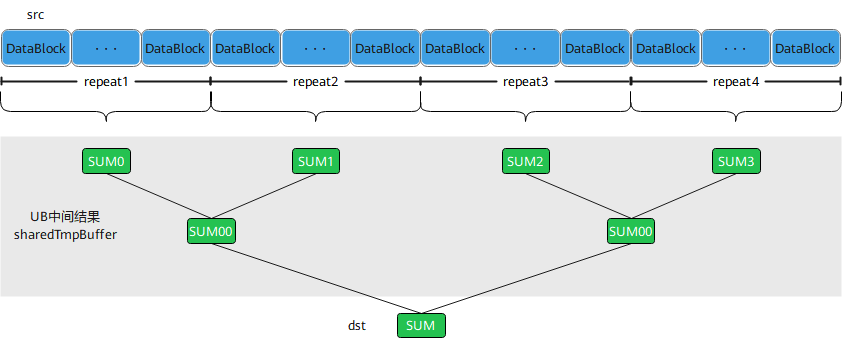
- 方式二:同一repeat内采用二叉树累加,不同repeat的结果也按二叉树累加。
- 方式三:不同repeat间通过向量加法将数据合并为一个repeat,repeat内采用二叉树累加。
ReduceSum接口以二叉树累加的方式完成每个repeat内的求和,详情请参考ReduceDataBlock关键特性说明。
对于上述两种累加方式,sharedTmpBuffer所需空间设置:
方式一:传入任意大小的
sharedTmpBuffer,sharedTmpBuffer不会被使用。方式二:按照如下计算公式计算所需空间:
C++int typeSize = 2; // half类型为2Bytes,float类型为4Bytes int elementsPerBlock = 32 / typeSize; // 1个datablock存放的元素个数 int elementsPerRepeat = 256 / typeSize; // 1次repeat可以处理的元素个数 int firstMaxRepeat = repeatTime; // 最后确定首次最大repeat值 // 注:对于tensor高维切分计算接口,firstMaxRepeat就是repeatTime;对于tensor前n个数据计算接口,firstMaxRepeat为count/elementsPerRepeat,对于count小于elementsPerRepeat的场景,firstMaxRepeat为1 int iter1OutputCount = firstMaxRepeat; // 第一轮操作产生的元素个数 int iter1AlignEnd = DivCeil(iter1OutputCount, elementsPerBlock) * elementsPerBlock; // 第一轮产生的元素个数做向上取整 int finalWorkLocalNeedSize = iter1AlignEnd; // 最终sharedTmpBuffer所需的elements空间大小就是第一轮操作产生元素做向上取整后的结果
不同硬件形态对应的ReduceSum相加方式如下:
- Atlas A3 训练系列产品/Atlas A3 推理系列产品,tensor前n个数据计算接口采用方式一,tensor高维切分计算接口采用方式二。
- Atlas A2 训练系列产品/Atlas A2 推理系列产品,tensor前n个数据计算接口采用方式一,tensor高维切分计算接口采用方式二。
- Atlas 200I/500 A2 推理产品,采用方式二。
- Atlas 推理系列产品AI Core,采用方式二。
- Atlas 训练系列产品,采用方式二。
- Kirin X90,采用方式二。
- Kirin 9030,采用方式二。
调用示例
更多样例请参考ReduceSum样例。
tensor高维切分计算样例-
mask连续模式:C++// dstLocal,srcLocal和sharedTmpBuffer均为half类型,srcLocal的计算数据量为8320,并且连续排布,使用tensor高维切分计算接口,设定repeatTime为65,mask为全部元素参与计算 int32_t mask = 128; AscendC::ReduceSum<half>(dstLocal, srcLocal, sharedTmpBuffer, mask, 65, 8);tensor高维切分计算样例-
mask逐bit模式:C++// dstLocal,srcLocal和sharedTmpBuffer均为half类型,srcLocal的计算数据量为8320,并且连续排布,使用tensor高维切分计算接口,设定repeatTime为65,mask为全部元素参与计算 uint64_t mask[2] = { 0xFFFFFFFFFFFFFFFF, 0xFFFFFFFFFFFFFFFF }; AscendC::ReduceSum<half>(dstLocal, srcLocal, sharedTmpBuffer, mask, 65, 8);tensor前n个数据计算样例:
C++// dstLocal,srcLocal和sharedTmpBuffer均为half类型,srcLocal的计算数据量为8320,并且连续排布,使用tensor前n个数据计算接口 AscendC::ReduceSum<half>(dstLocal, srcLocal, sharedTmpBuffer, 8320);tensor高维切分计算接口示例:
C++#include "kernel_operator.h" int srcDataSize = 8320; int dstDataSize = 16; int mask = 128; int repStride = 8; int repeat = srcDataSize / mask; // 这里是65 // 初始化srcLocal 、dstLocal 、sharedTmpBuffer AscendC::LocalTensor<half> srcLocal = inQueueSrc.DeQue<half>(); AscendC::LocalTensor<half> dstLocal = outQueueDst.AllocTensor<half>(); AscendC::LocalTensor<half> sharedTmpBuffer = workQueue.AllocTensor<half>(); // mask为128一次计算128个元素,65次repeat计算完8320个数 AscendC::ReduceSum<half>(dstLocal, srcLocal, sharedTmpBuffer, mask, repeat, repStride); // 释放Tensor outQueueDst.EnQue<half>(dstLocal); inQueueSrc.FreeTensor(srcLocal); workQueue.FreeTensor(sharedTmpBuffer);示例结果如下:
输入数据src_gm:[1. 1. 1. ... 1. 1. 1.]
输出数据dst_gm:[8320. 0. 0. 0. 0. 0. 0. 0. 0. 0. 0. 0. 0. 0. 0. 0.]
tensor前n个数据计算接口示例:
C++#include "kernel_operator.h" int srcDataSize = 288; // 初始化srcLocal 、dstLocal 、sharedTmpBuffer AscendC::LocalTensor<half> srcLocal = inQueueSrc.DeQue<half>(); AscendC::LocalTensor<half> dstLocal = outQueueDst.AllocTensor<half>(); AscendC::LocalTensor<half> sharedTmpBuffer = workQueue.AllocTensor<half>(); // level2接口计算前288个数,计算前288个数的和 AscendC::ReduceSum<half>(dstLocal, srcLocal, sharedTmpBuffer, srcDataSize); // 释放Tensor outQueueDst.EnQue<half>(dstLocal); inQueueSrc.FreeTensor(srcLocal); workQueue.FreeTensor(sharedTmpBuffer);示例结果如下:
输入数据src_gm:[1. 1. 1. ... 1. 1. 1.]
输出数据dst_gm:[288. 0. 0. 0. 0. 0. 0. 0. 0. 0. 0. 0. 0. 0. 0. 0.]